


Cancellations, Declines, No-Shows & Refunds
04/09/2026
Cancellations, Declines, No-Shows & Refunds (Overview)
Important: This article is provided for general overview and guidance only and does not replace the official Terms of Service, which govern use of the Platform.
This page provides a simplified overview of how cancellations, order declines, no-shows, and return / refund requests work on 3D RENT hub.
Key Concepts
- Cancellation – Only possible before shipment or pickup and requires Vendor approval.
- Decline (COI-related) – Order does not proceed due to missing or unapproved insurance (COI).
- No-Show – Renter fails to accept delivery or pick up equipment.
- Return / Refund – Used after shipment or pickup for both standard returns and issue-based cases.
Refund & Responsibility Overview
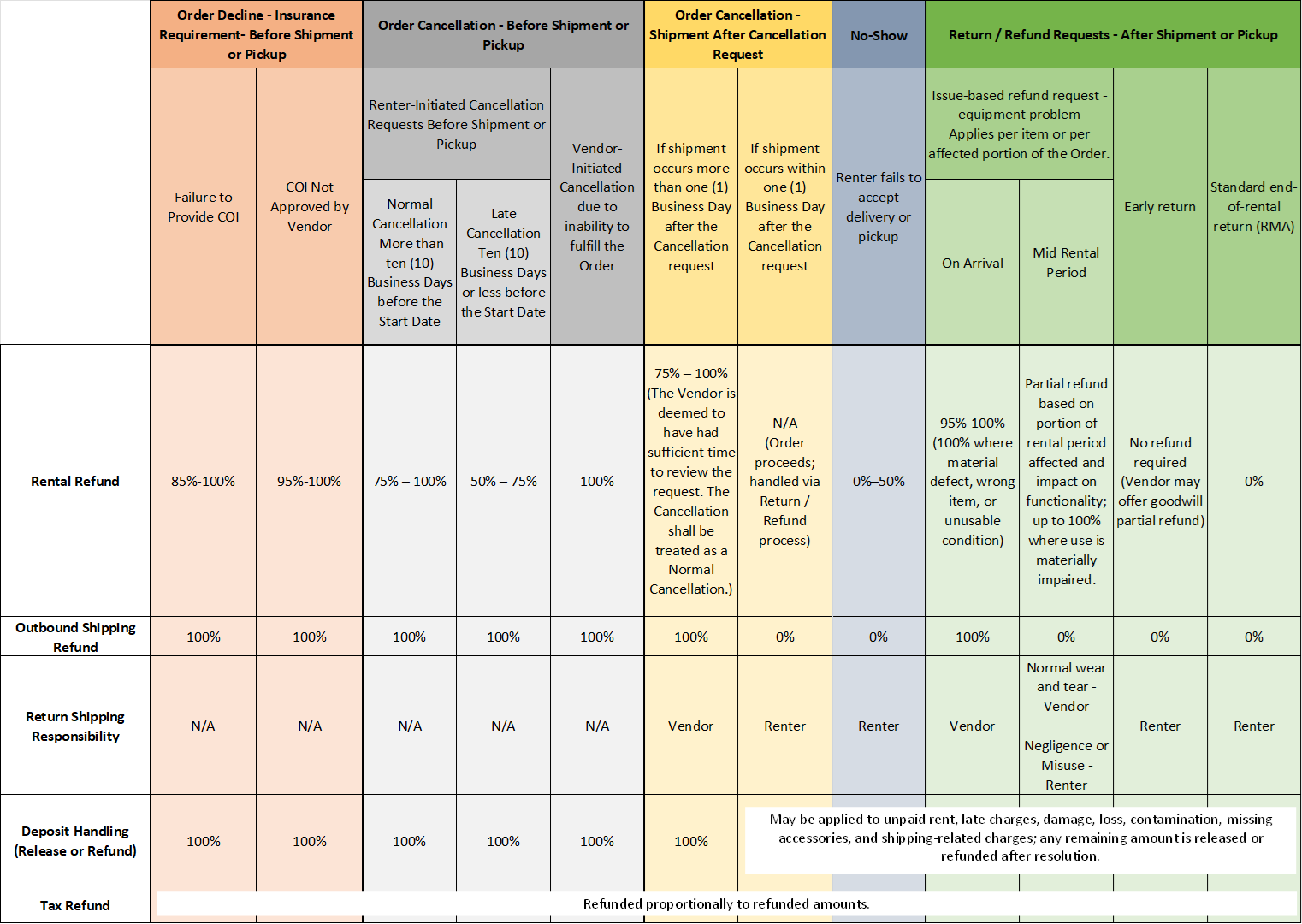
The table below summarizes common scenarios. Actual outcomes depend on timing, circumstances, and Vendor review, in accordance with the Terms of Service.
Important Notes
- Refunds are not automatic. They may be full, partial, or not issued depending on the situation.
- Cancellation timing is based on when the request is submitted in the Order thread (not when reviewed).
- Return shipping responsibility depends on the reason for the return, as shown in the table above.
- Early returns do not automatically result in a refund.
- Security deposits are handled separately and may be applied to damages, loss, or other charges before any remaining amount is released.
- Taxes are refunded only on the portion of the Order that is actually refunded, if applicable.
When to Use Each Option
- Before shipment → Request Cancellation via Order thread
- After shipment → Submit Return (RMA/Refund) Request
- Problem with equipment → Contact the Vendor → Submit Return (RMA/Refund) Request → Refund
- End of rental → Submit Return (RMA/Refund) Request → Return item (no refund)